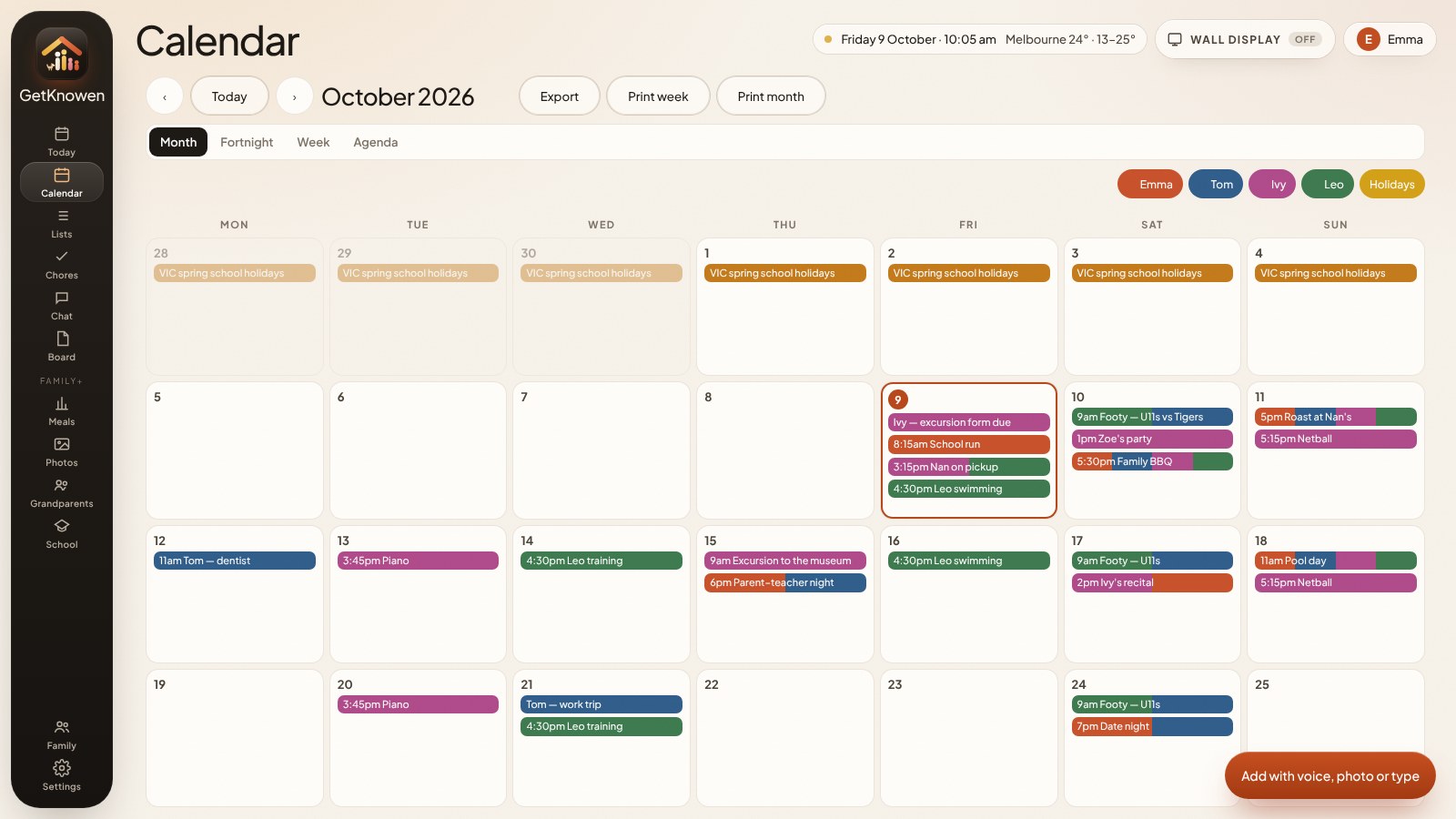
The family calendar app for Australian households: school, sport, pickups and the shopping list on the tablet you already own and every phone in the house. Snap the school note or say it out loud — everyone else just looks.
Your city’s holidaysSchool and public, loaded for you
Stored in SydneyPrivate to your family
The mental load
You don’t need another app. You need the week out of your head.
Most houses already have a calendar, a group chat and a fridge. They still run on one tired adult answering “what’s on?” GetKnowen puts the answer on the wall, so everyone else can just look.
Before
You are the noticeboard
Three chats, a paper calendar, a school email, and someone in the hallway asking what’s on tomorrow. If you’re sick or at work, nobody knows.
Your head
A group chat nobody reads
The note at the bottom of the school bag
Four different school emails
After
The wall already answered
The week is on the tablet. The other adult added sport. The list is ticked. You make dinner. Nobody interviews you at the fridge.
One board the whole house can see
Every person in their own colour
Snap it, say it or type it
Lists, chores and dinners next to the week
Forty seconds
A normal week, finally in one place.
What it does
Built for how an Aussie week actually runs.
Colour by person
See the clash on Sunday night, not in the car on Saturday.
Every kid, parent and Nan gets a colour. Footy, swim and piano sit side by side, so double-booked mornings jump out.
Snap it
The school note goes on the board, not in the bag.
Say it
“Ivy excursion Thursday 9am.”
Say it or type it in plain words. GetKnowen fills in the day, the time and who it’s for.
IvyThu 15 Oct9:00 am
Whole family
Nan’s on pickup. She already knows.
Chores
Jobs they actually want to tick off — with tokens and pocket money.
Forward it
Forward the school email. It’s on the board.
Your family gets its own address. Forward the newsletter, the party invite or the club email and it shows up on Today — one tap turns it into an event with the date and time filled in.
From your inboxYear 3 excursion — Thursday 9amWestside Primary · Bring a hat and $25Add to board
Dinners
Snap the fridge. Get dinner.
Photograph the fridge and the pantry. It spots what you’ve got and suggests dinners from 150+ recipes with photos. Plan the week and the ingredients land on the shopping list.
✓ chicken✓ rice✓ capsicum✓ eggs+ cream
TonightChicken fried riceUses 4 of yoursPut on Thursday
Kids’ chores
Chores that grow up with them.
On Family and Family+, every kid gets a chore screen built for their age, worked out from their birthday. It moves up on its own at 8 and 13, and you can preview exactly what each kid sees.
Hi Mia! 👋★★★★1 job to go. You can do it!
🛏️Make bed✓🪥Brush teeth✓🐶Feed the dog✓🧸Tidy toys
Woohoo! ⭐
Littlies · up to 7Giant picture tiles, a star chart and confetti for every job.
LEVEL 3Jordan · Pro
🔥 5day streak
80 / 100 XP · 2 jobs to Level 4
🍽️Empty dishwasher✓ Done
🗑️Put out the binsDo it
👕Fold laundryDo it
Tweens · 8 to 12Levels, XP, streaks and progress towards prizes.
TESS1 of 3 done
$86.50+$18 this week
Mow the lawn$10
Cook dinner Tuesday$8
Vacuum lounge$5
Teens · 13 and upA clean list with their money front and centre.
Two houses
Which house tonight, on every night.
Week on/week off, 2-2-5-5 or your own pattern. Handovers are marked, swapped nights show up for both of you, and the school stuff lands in both houses. For separated families →
Mum’s houseDad’s house⇄Handover2-2-5-5
Mon6Tue7Wed8⇄Thu9Fri10⇄Sat11Sun12
Mon13Tue14Wed15⇄Thu16Fri17Sat18SwapSun19
This fortnightMum 8 nightsDad 6 nightsNext handover · Wed 3:30pm
Tonight · Tue 14Mum’s houseHandover to Dad Wed 3:30pm at school pickup
Swap · Sat 18Mum has the kidsNetball carnival. Agreed by both — on both boards.✓ Both houses see it
Both housesYear 3 excursion — Thu 9amForwarded by Mum, on Dad’s board too.
Food diary · Family+
Type “2 eggs and a banana.” Done.
It works out the nutrition from the Australian food database, so there’s no searching or weighing. Adults get the full picture, teens get a food-groups view, and little kids tap a picture of what they ate. Everyone’s diary is private to them, and it never shows on the wall.
Private chats
Say it to one person, not the whole house.
Message one person or start a group, and only the people in it can see it. “The house” is the family chat everyone shares, and it’s the only chat the wall display shows.
Who changed what
“Since you last looked”
Soccer moved to 4:30. Milk was added. The board tells the next person, so nobody finds out in the car park.
Set up
Twenty minutes. This weekend.
No family meeting. No migration project. One adult starts and the rest join.
No app store needed. Open getknowen.com on any phone or tablet, tap Share → Add to Home Screen, and it opens full screen like an app. iPhone, Android, iPad and Android tablets all work.
What tablet should go on the wall?
The one in your drawer. Any iPad from the last six or so years, or a cheap Android tablet, plus a stick-on wall mount. Scan a QR from your phone and it signs in and stays on. No A$300 screen.
Do I need a card to start?
No. You get 14 days of Family+, free. At the end you pick Family Lite (A$4.99), Family (A$9.99) or Family+ (A$14.99) a month — or walk away, nothing to cancel.
Can the other parent, the kids and Nan join?
Yes, on Family and Family+. The account holder invites each person; they log in as themselves and see the same week. Kids get a simpler view. Our people comes with Family+: Nan, the babysitter and other helpers each get their own login that shows only the list you share with them, plus a chat with the house. Family Lite covers two logins.
Can I forward school emails to the board?
Yes. Every Family and Family+ household gets its own address under Settings — pick your own name, like [email protected]. Forward the school newsletter, a party invite or a club email to it and it shows on Today under “From your inbox”. One tap turns it into an event with the date, time and details filled in.
Can it tell me what to cook from what’s in the fridge?
Yes, on Family+. Snap the fridge and the pantry. GetKnowen spots the fruit, veg and anything with a label, you tick what it missed, and it suggests dinners from 150+ recipes with photos, starting with the ones that use the most of what you’ve got. The photos are read on your phone and never uploaded.
Do the kids’ chores suit different ages?
Yes, on Family and Family+. Each kid gets a chore screen built for their age, set from the birthday you add. Littlies (up to 7) get big picture tiles, a star chart and confetti. Tweens (8 to 12) get levels, XP and streaks. Teens (13 and up) get a clean list with their money front and centre. It moves up on its own at 8 and 13, you can change it for any kid, and you can preview exactly what each kid sees.
Does it work with our Google or Apple calendar?
Yes, on Family and Family+. Paste the calendar’s share link (Google, Apple, school or sport club) and it shows on the board in its own colour, kept up to date. It’s a read-only feed, so changes you make in GetKnowen don’t go back to Google or Apple. Family Lite doesn’t include calendar import.
Who can see our family's stuff?
Only the people in your family. Your board is private to your household, stored in Sydney, and never sold or shown to advertisers. See the Privacy Policy.
The house knows
Fewer “did you know?” texts. More nights like this.
Fourteen days free. Your sport, your school, your shopping list. If it doesn’t earn its spot on the wall, walk away.